
Your online store shows 25 units in stock. A customer places an order, but when the warehouse checks the shelf, only 18 are available.
Where did the other seven go?
They may have been damaged, misplaced, or recorded incorrectly when stock arrived or orders were processed.
This is exactly the kind of problem inventory control is designed to address. For ecommerce sellers, accurate stock records help you understand how many units are actually available, where products are stored, and which items are ready to ship.
What Is Inventory Control?
Inventory control is simply about knowing what stock you have, where it’s stored, and whether it’s actually available to sell.
That sounds straightforward, but things can get messy once orders start coming in. A product might be damaged, placed on the wrong shelf, or shipped without the inventory record being updated correctly.
That’s why inventory control involves more than checking numbers in a spreadsheet. It also means keeping track of stock movements and looking into discrepancies when the recorded quantity doesn’t match what’s physically available.
It’s closely related to inventory management, but the two aren’t quite the same. Inventory management covers the bigger picture, including what to buy, how much stock to keep, and when to reorder. Inventory control focuses more on keeping the stock you already have accurate and accounted for.
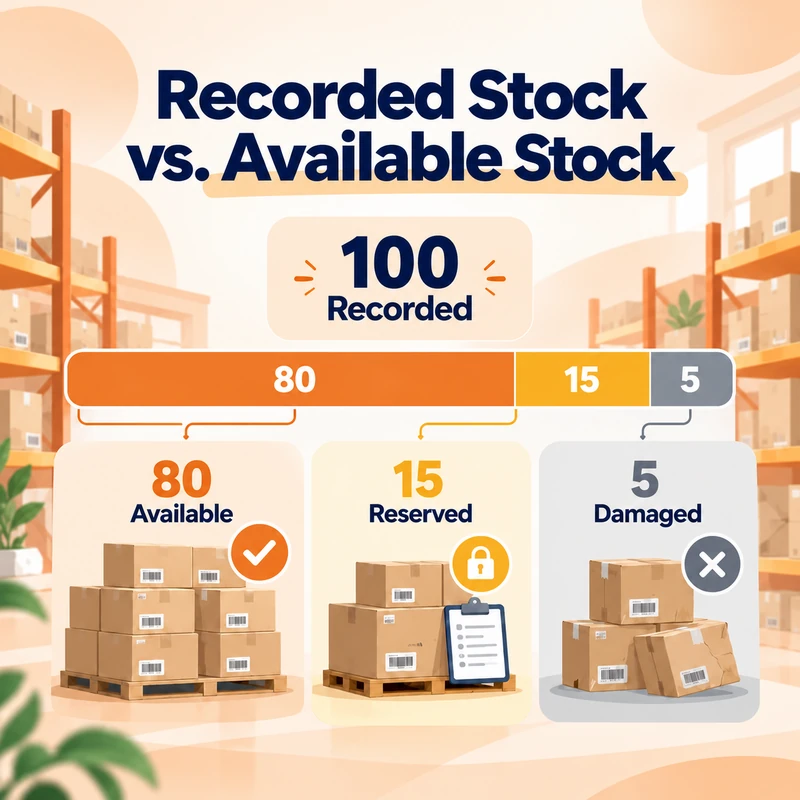
For an online store, that difference matters. Seeing 100 units in your system doesn’t necessarily mean you have 100 units ready to ship. Some might already be reserved for orders, stored elsewhere, or unavailable for sale.
Why Inventory Control Matters for Ecommerce
When your stock records don’t match what’s actually on the shelves, the problems can go well beyond a few missing items.
Overselling and stockouts
If your website shows more stock than you actually have, customers may order products you can’t fulfill. That can lead to cancellations, shipping delays, and extra customer service work.
In other cases, stock may run out before anyone notices, leaving you unable to fulfill new orders until more inventory becomes available.
Picking and packing problems
Even when a product is physically in the warehouse, it isn’t much help if the fulfillment team can’t find it.
Incorrect storage locations or unrecorded stock movements can slow down picking and make it harder to prepare orders accurately.
Unnecessary purchasing
Inaccurate inventory records can lead to poor purchasing decisions.
You might reorder products that are already sitting in the warehouse or discover too late that you don’t have enough stock to cover upcoming orders.
Unreliable stock reporting
Damaged items, customer returns, and transfers between storage locations all affect inventory records.
If these changes aren’t recorded properly, it’s harder to tell which products are available, which need attention, and whether your stock figures can be trusted.
These problems tend to become more complicated as your product range grows. Managing a few standard items is one thing. Keeping track of different sizes, colors, scents, and packaging variations takes much closer attention.
All of these issues can affect order fulfillment. When stock quantities, storage locations, and product availability aren’t recorded correctly, even a straightforward order can take longer to process.
That’s why inventory control needs to work alongside receiving, storage, picking, and packing—not just exist as a set of numbers in a system.
Common Inventory Control Methods
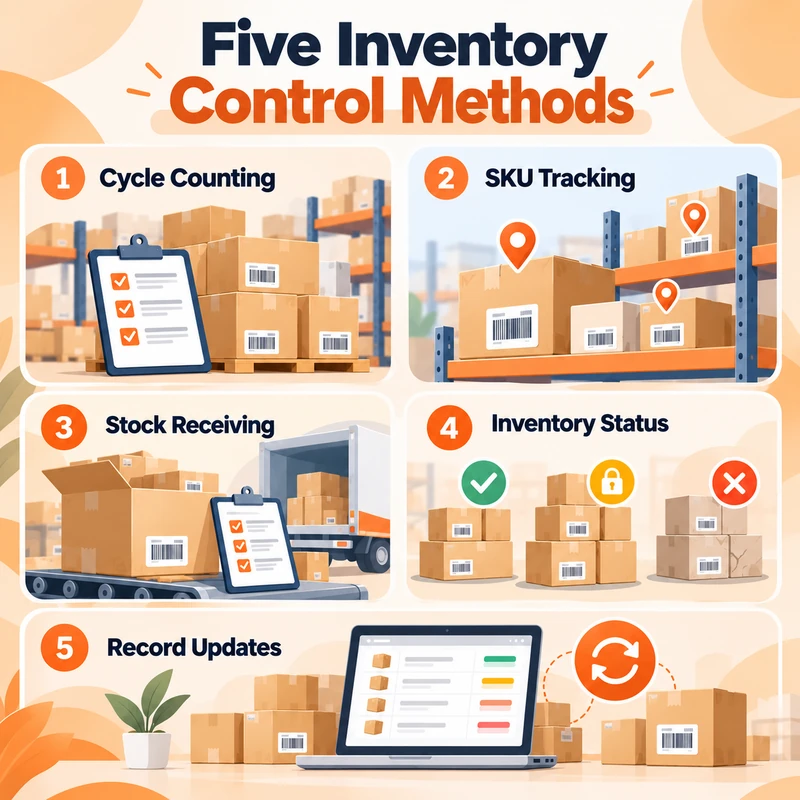
There isn’t one method that solves every inventory problem. Most ecommerce businesses benefit from combining several simple practices.
1. Cycle Counting
Cycle counting means checking a portion of your inventory regularly rather than counting everything at once.
For example, you might count fast-moving SKUs every week while checking slower-moving products less often, depending on their value and risk.
This helps catch discrepancies before they cause bigger problems.
Say your system shows 80 units of a product, but a physical count finds only 74. Instead of simply changing the number, look into recent orders, deliveries, returns, and stock movements to find out what happened.
The point isn’t just to fix the count. It’s to understand why it was wrong in the first place.
2. SKU and Location Tracking
Every product variation needs to be easy to identify.
A T-shirt available in three sizes, for example, should have a separate SKU for each size. Otherwise, it’s easy to confuse one variation with another when receiving, storing, or picking stock.
Knowing which product you have is only half the job. You also need to know where it is.
Instead of recording that an item is somewhere in the warehouse, assign it a specific storage location. This makes products easier to find and helps staff investigate missing stock.
Keep SKU information consistent across purchase orders, inventory records, and fulfillment instructions.
3. Receiving and Stock Reconciliation
Good inventory records start when products arrive at the warehouse.
Before adding incoming stock to your available inventory, check it against the purchase order or agreed shipment details.
Make sure the products, quantities, and variations are correct. Damaged items and shortages should also be recorded rather than included in sellable stock.
For example, a shipment might contain 100 supplement bottles as expected, but some could be the wrong variation. If you only check the total quantity, the mistake may go unnoticed until an order needs to be fulfilled.
A careful receiving process helps prevent these errors from entering your inventory records in the first place.
4. Inventory Status and Batch Tracking
Just because a product is in your warehouse doesn’t mean it’s ready to sell.
Some units may already be reserved for customer orders. Others could be damaged, awaiting inspection after a return, or still in transit.
Keeping these inventory statuses separate helps prevent unavailable products from being counted as sellable stock.
Certain products also need more detailed tracking.
For supplements, this may include batch numbers and expiration dates. Cosmetics and other products may require different information depending on their characteristics and applicable requirements.
The goal is to know not only how many units you have, but also which ones can actually be sold or shipped.
5. Regular Inventory Audits and Record Updates
Even a well-organized warehouse can end up with inaccurate records if stock changes aren’t recorded consistently.
A customer return might arrive without being updated in the system. A damaged item could be removed from a shelf, or products might be moved to another storage location without anyone recording the change.
These small gaps can add up over time.
Make sure sales, returns, damaged goods, and stock transfers are recorded as they happen, or as promptly as your workflow allows.
When mistakes occur, document what went wrong and correct the records. If the same issue keeps appearing, review the process behind it rather than repeatedly making the same adjustment.
How to Improve Inventory Accuracy
Knowing which inventory control methods to use is one thing. Making them part of your daily operations is another.
You don’t have to change everything at once. For a smaller online store, start by building a few habits your team can follow consistently:
- Keep product information consistent. Make sure each product variation has a clear SKU and the same identifying details across your records.
- Update stock as it moves. Record incoming deliveries, fulfilled orders, returns, and damaged goods as promptly as possible.
- Keep unavailable items separate. Make it clear which products are reserved, damaged, or awaiting inspection so they aren’t accidentally sold.
- Make stock counts a routine. Set a regular schedule, pay closer attention to fast-moving items, and follow up when numbers don’t match.
- Decide who’s responsible. Whether you manage stock yourself or work with a warehouse team, everyone should know who updates records and handles discrepancies.
For a store selling only a handful of products, a well-maintained spreadsheet may be enough to get started. But as orders increase or inventory spreads across multiple locations, keeping everything updated manually becomes more difficult.
That’s when dedicated inventory software or warehouse management tools may be worth considering, especially if you’re selling through more than one channel.
Whatever system you use, the goal is the same: keep stock information accurate enough to make decisions and fulfill orders without unnecessary surprises.
Final Thoughts
Good inventory control isn’t just about knowing how many products you have. It’s about knowing what’s actually available to sell and making sure your stock records match what’s happening in the warehouse.
You don’t need to get everything perfect overnight. Start with a few reliable practices, keep your records up to date, and review your process as your business grows.
If you work with a sourcing or fulfillment partner, make sure you understand how incoming stock is checked, how inventory discrepancies are handled, and how product availability is confirmed before orders are processed.
At GoShipFulfil, you can discuss your product sourcing and fulfillment requirements, including inventory arrangements, to explore a workflow that fits your business.